The HUD Is the Message: How RLCS 2025 Pros Optimize Their Visual Interface for Late-Game Decisions

Photo: jjdhd Beirnrj Psyonix Studios, CC BY-SA 4.0, via Wikimedia Commons
You've spent hours dialing in your camera settings. Your deadzone is tuned to two decimal places. Your controller bindings are muscle memory. And yet, when the game clock hits 30 seconds and the score is tied, something slows down. Your decision-making gets foggy. You check the timer a half-second too late. You boost into a challenge without realizing you're at 12.
This isn't a mechanics problem. It's a visual interface problem — and the RLCS 2025 pros have already solved it.
While the community pours energy into camera FOV debates and sensitivity optimization threads, a quieter conversation has been happening at the top of competitive Rocket League. It's about HUD layout, boost meter positioning, timer visibility, and the cognitive load those elements create in high-pressure moments. The players winning close games in RLCS 2025 aren't just more mechanically gifted. They've engineered their visual environment to deliver the right information at the right time with the least possible mental effort.
 Photo: Rocket League, via i.ytimg.com
Cognitive Load Is a Real Performance Variable
Before getting into the specifics, it's worth understanding why HUD optimization matters at a neurological level. Cognitive load theory — the idea that your working memory has a finite processing capacity — applies directly to competitive gaming. Every piece of information your brain has to consciously locate and interpret during a match is consuming processing bandwidth that could otherwise go toward reading the play, positioning, and executing mechanics.
At Diamond and below, cognitive load is rarely the limiting factor. There's enough downtime between meaningful decisions that you can afford to glance at the timer, scan the boost meter, and check the scoreboard without missing critical windows. At Grand Champ and above, those windows compress. At the RLCS level, they nearly disappear.
The pros who perform best in late-game scenarios are the ones whose HUD configuration has reduced the cognitive cost of information-gathering to near zero. They don't think about checking the timer. Their brain absorbs it peripherally. That's a config decision, not a talent one.
The Boost Meter Placement Problem
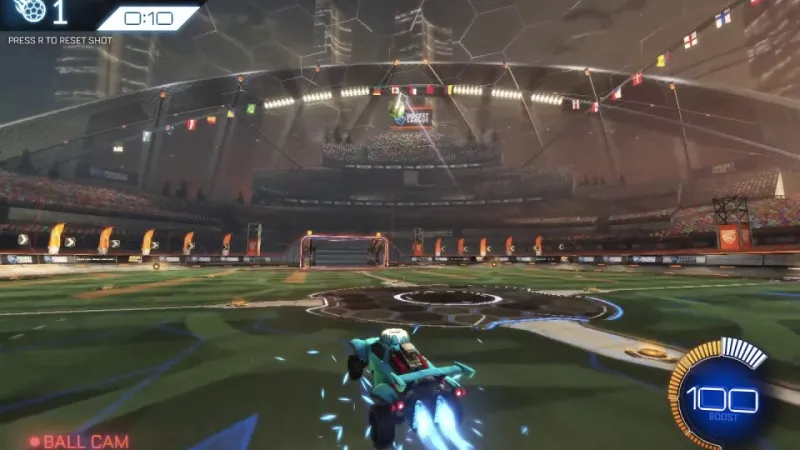
Rocket League's default boost meter placement sits at the bottom-center of the screen, beneath the ball cam. For most players, this is fine. But watch RLCS broadcast footage carefully — specifically the in-game player cam feeds that some broadcasts include — and you'll notice that elite players almost never make an explicit eye movement to check their boost.
That's not because they're not tracking it. It's because their camera setup and HUD configuration have been tuned so that the boost meter falls within their peripheral vision zone during normal gameplay. When your camera distance and height are set correctly for your monitor size and resolution, the boost meter should be visible without a direct sightline shift.
The players who struggle with boost management in late-game situations are often those whose camera settings push the action so far toward the center of the screen that the HUD elements get pushed outside the natural peripheral processing zone. Adjusting camera height slightly downward, or pulling camera distance in by 10–15 units, can bring the boost meter back into passive view without requiring a conscious glance.
Timer Visibility and the 30-Second Cognitive Spike
The game clock is arguably the most psychologically loaded element on the HUD. In the final 30 seconds, players at every rank experience a measurable spike in decision-making errors — rushed shots, poor rotations, unnecessary challenges. Part of that is pressure. But part of it is that the timer becomes the dominant focal point, pulling attention away from the ball and the field.
Elite RLCS players manage this by treating the timer as background data rather than a primary focus. That's only possible if it's positioned somewhere in their established peripheral awareness zone. The default timer placement at the top-center of the screen works well for this because it's above the action, not competing with it — but only if your field of view and camera height aren't pushing the ball-cam action up into that zone.
Some pros have discussed (in post-match interviews and community interactions) deliberately keeping the scoreboard and timer in their peripheral awareness during free play training — not to practice specific mechanics, but to build the habit of passive information absorption. It sounds almost too simple. But the difference between consciously checking the clock and unconsciously knowing it is a meaningful cognitive load reduction.
Scoreboard Configuration and Mental Momentum
This one is subtle but worth raising. The scoreboard in Rocket League shows score, saves, shots, and assists for both teams. Most players glance at it occasionally. The pros are more deliberate about when and how they process it.
In RLCS 2025, there's been notable discussion in coaching circles about scoreboard fixation as a psychological trap. Players who check the scoreboard too frequently during active play are diverting attention from the present moment to a historical summary. The score matters at specific decision points — going up by one with 45 seconds left changes your rotation strategy — but checking it during a possession chain costs you present-moment awareness.
The config angle here is about HUD opacity and positioning. Some competitive players reduce the opacity of secondary HUD elements — scoreboard, stat line — to make them available for intentional glances without being visually dominant during active play. Rocket League's HUD customization options are limited compared to some games, but the options that exist are worth using deliberately.
Building a Low-Cognitive-Load HUD Setup
Here's a practical framework for auditing your current visual interface setup:
Step one: Load into a free play session and, without touching the ball, identify where your eyes naturally rest when the car is in motion. That's your primary visual anchor point. Everything that matters should be within about 15 degrees of that point.
Step two: Check whether your boost meter is visible from that anchor point without a deliberate eye movement. If it isn't, adjust your camera height or distance until it is. Small changes — we're talking 5–10 units — can make a significant difference.
Step three: Do the same test with the timer. You don't need to read it constantly, but you should be able to absorb it in your peripheral field during normal gameplay. If your camera setup is pushing the action into the upper portion of the screen, the timer may be getting crowded out.
Step four: Play a ranked session with explicit attention to how often you make a conscious eye movement to check boost or the clock. Every deliberate check is a moment of divided attention. Your goal is to reduce those to near zero through placement optimization, not through ignoring the information.
The Bigger Picture
The Rocket League config community has done incredible work optimizing the inputs side of the equation — controllers, deadzones, camera settings, sensitivity curves. The output side — how the game presents information back to you — has received a fraction of that attention.
The RLCS 2025 players who are winning close games in overtime aren't just mechanically superior. They've built a visual environment that lets them process the game faster, with less mental effort, exactly when the pressure is highest. That's not a talent advantage. It's an engineering advantage.
And engineering advantages are copyable. Start with your boost meter. The rest follows.